Beyond the Memory Wall: The CPU Was Helping You All Along
The False Confidence
Blog 1 ended with what felt like a satisfying explanation. DRAM is slow, the cache hierarchy exists to hide that fact, and if your working set grows large enough to spill out of cache, you start paying the full cost of main memory access. I even had the experiments to back it up: the 64-byte cache line showed up right where the hardware said it would, and the latency curves bent exactly the way the mental model predicted. It felt like I'd caught the memory subsystem with its pants down.
So naturally, I assumed the next set of experiments would just be more of the same. Bigger working sets, slower access times, the memory wall doing its thing on a larger stage. I set up a working set sweep in Aletheia ranging from 1KB all the way upto 64MB, expecting to watch latency climb steadily as the data outgrew each level of cache. What I did not expect was to find myself 20 minutes later questioning whether my benchmark was broken.
The sequential scan results looked wrong in the most confusing possible way, not wrong like garbage values or obvious bugs, but wrong like "this should be slower and it isn't and I don't know why." A 64MB sequential scan, well into DRAM territory, was not behaving like something that had to pay 100 nanoseconds per cache miss. Same machine, same DRAM, same cache hierarchy I'd spent an entire post describing as the fundamental bottleneck of modern computing.
So either I had misunderstood the memory wall, or the CPU was quietly doing a lot more work than I had given it credit for.
The Weird Result
The experiment was straightforward. A working set sweep in Aletheia, ranging from 1KB to 64MB, measuring average latency per access at each size. The goal was to cross the cache hierarchy intentionally and watch what happens. Small buffers should feel fast, larger ones should slow down gradually, and once the working set grows large enough, DRAM should start making itself obvious.
At first, the numbers behaved exactly as expected. Small buffers sat around a few nanoseconds per access, larger working sets got progressively more expensive, and the general shape felt reassuringly familiar. Memory was getting slower as data grew, exactly as we saw in Blog 1.
[!Spoiler Alert]
Then things got weird :)
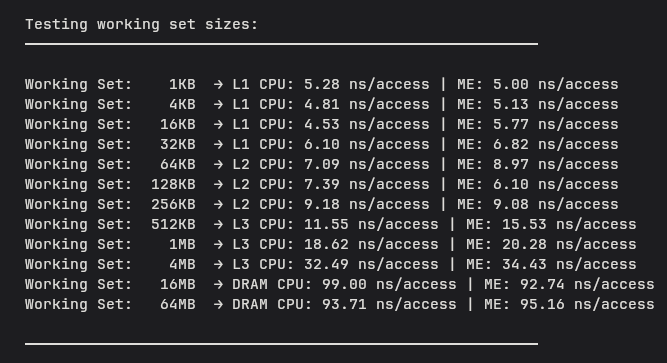
Sequential working-set sweep results. At this point, the numbers looked suspiciously reasonable for something supposedly paying DRAM latency.
The larger working sets were clearly touching DRAM, but the results still looked strangely reasonable. A 16MB sequential scan landed at around 99ns per access, while a 64MB scan came back at around 94ns. Not only was the slowdown less dramatic than expected, the numbers were not even increasing cleanly anymore.
This felt suspicious so I reran it, stared at the measurement code for longer than I would like to admit, and convinced myself I had probably done something stupid. Same result every time.
If DRAM access really costs around 100ns, why did scanning through tens of megabytes of it sequentially still feel surprisingly cheap?
The Wrong Hypothesis
My first instinct was that the answer had to be hiding somewhere in the access pattern itself. Sequential scans felt unusually well-behaved, and pointer chasing, at least from the outside, felt far more chaotic. So naturally I assumed the real explanation probably lived somewhere between those two extremes.
[!Thought Of The Day] What if the distinction was not sequential versus random, but predictable versus unpredictable?
This led me to stride access. Instead of touching every element sequentially, memory gets accessed at fixed intervals, skipping a few elements, then a few more, then much larger jumps. Intuitively this felt like a reasonable middle ground, less orderly than a sequential scan but not completely chaotic either. If sequential was too easy and pointer chasing was too painful, stride felt like the obvious next experiment to run.
So I tried it. The results were interesting, but strangely unsatisfying. Some strides clearly hurt more than others, and larger jumps made things noticeably slower. But the experiment never really answered the question that had been bothering me. Memory still seemed strangely resistant to becoming as painful as I expected it to be.
At some point I realized I was probably asking the wrong question entirely. Maybe randomness itself was not the real problem. Maybe the better question was this: what exactly stops the CPU from helping?
The Better Question
Up until this point I had been treating randomness and pointer chasing as roughly the same thing. They both felt chaotic, they both seemed hostile to cache locality, and they both looked nothing like the neat orderly world of sequential scans. But somewhere in the middle of all this confusion I realized I had quietly bundled together two very different ideas.
[!Surprise] Random access is not the same thing as pointer chasing.
At first this sounded like hair-splitting. Memory is memory, right? If accesses are unpredictable, surely the CPU suffers either way. But the more I thought about it, the stranger that assumption started to feel.
Imagine asking someone to fetch books from a library. Random access looks something like this: "Get me books from shelf 3, shelf 17, shelf 42, and shelf 91." The requests are scattered, sure, but they are independent. Nothing stops the librarian from grabbing several at once.
Pointer chasing is different. "Go to shelf 3. Inside that book is the location of the next one. Come back and tell me where to go next." Suddenly every single step depends on the result of the previous one, and the whole process grinds into a strict sequence that nobody can shortcut.
That distinction started feeling important. Before going any further, I wanted to compare the two extremes properly. If sequential access really was the "easy mode" for memory, and pointer chasing was the painful one, then the difference should show up clearly in the data.
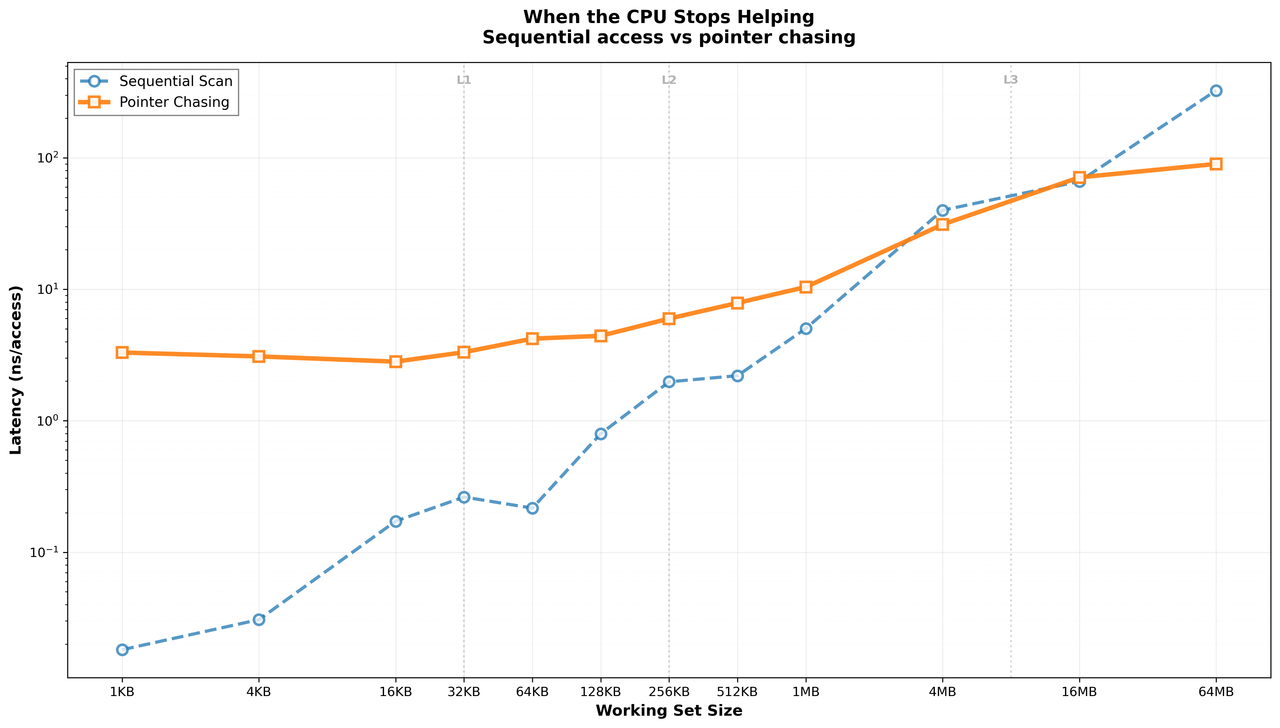
Sequential access and pointer chasing behaving wildly differently on the exact same memory subsystem.
At this point, a more interesting question started forming in my head. If these are the two extremes, where exactly does random access fit?
The Missing Middle
Sequential felt like the easy mode, pointer chasing was clearly the painful extreme, and random access seemed like it had to live somewhere between those two.
So I added one more experiment, keeping everything identical except the access pattern itself.
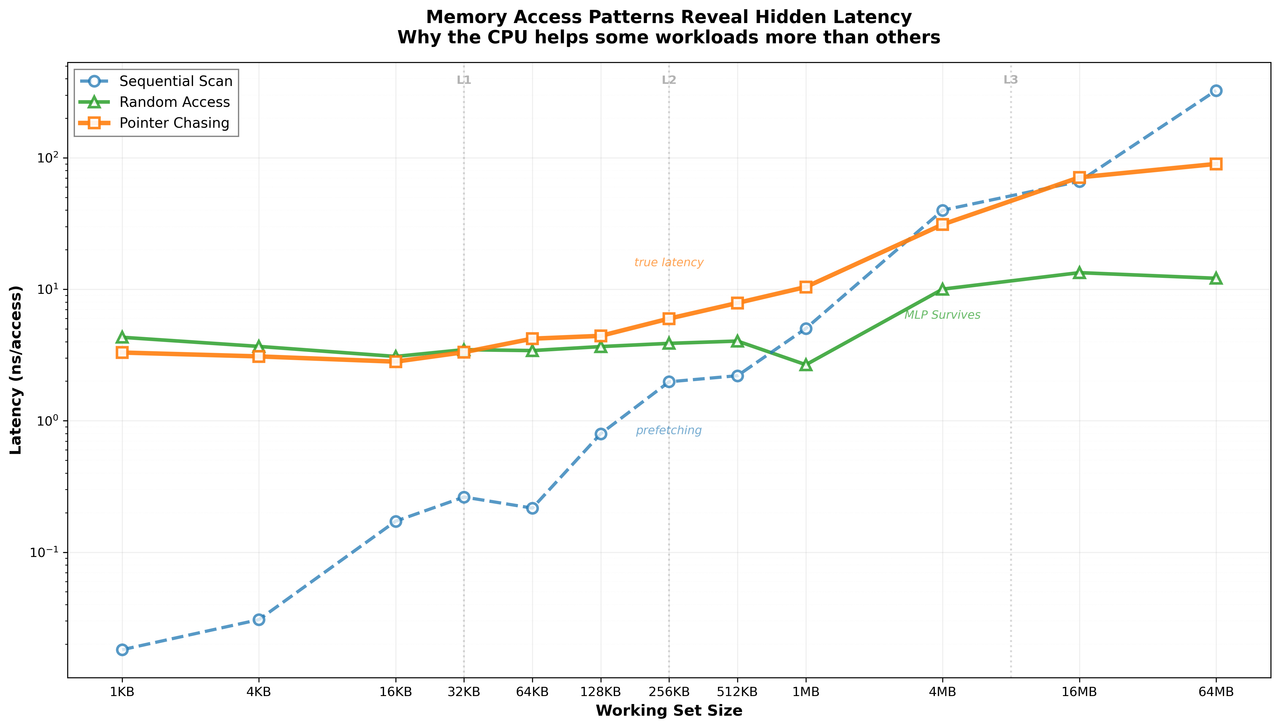
Sequential access, random access, and pointer chasing on the same memory hierarchy.
This graph made things click. Sequential access stayed surprisingly resilient well into DRAM territory, which at this point I had almost started to expect. Pointer chasing told a much grimmer story, becoming expensive earlier and climbing far more aggressively as the working set grew. Random access landed roughly where the intuition suggested it would, more expensive than sequential but nowhere near as brutal as pointer chasing.
At this point it stopped feeling reasonable to blame memory alone. The hardware was clearly doing something different for each of these patterns, and figuring out what that was felt like the only interesting question left on the table.
Defeating The CPU
The graph made one thing pretty obvious. These workloads were not just measuring memory, they were measuring how successfully each access pattern defeats the CPU's ability to hide latency. The same DRAM felt wildly different depending on what the workload allowed the hardware to do.
Sequential Access: The CPU Sees It Coming
Sequential access is almost suspiciously friendly to hardware. Memory gets touched in a neat predictable order, which gives the CPU an opportunity to prepare ahead of time, and by the time the program asks for future data parts of it are often already moving through the system. This is where hardware prefetching quietly changes the game. Instead of waiting for every cache miss to hurt individually, the CPU tries to guess what you will need next and starts pulling it in early. Sequential scans make this job embarrassingly easy, which is why memory still felt surprisingly reasonable even when the working set spilled far beyond cache.
Random Access: Some Help Survives
Random access loses some of that predictability, but things still do not completely collapse, which genuinely surprised me. The key difference is that random accesses are still independent. Even if the addresses are scattered across memory, the CPU does not have to wait for one request to finish before starting another, so while one memory request is still travelling through DRAM several others can already be in flight. This is where memory-level parallelism quietly saves the day. Latency still exists, but multiple delays overlap instead of piling up one after another.
Pointer Chasing: One Miss At A Time
Pointer chasing breaks almost all of this. Every access depends on the previous result, so you cannot ask for the next address until the current one finally arrives. No prefetching, very little overlap, and no opportunity for the CPU to stay ahead of the workload. At that point memory latency stops being something the hardware quietly absorbs and becomes something you feel directly and painfully.
This blog contains dangerously high amounts of “it depends” energy, which I am told is a common side effect of learning computer architecture.[!My Lightbulb Moment] This ended up being the biggest takeaway from the entire experiment. Memory is not always expensive. Serialized memory is expensive.
Beyond The Memory Wall
Going into these experiments I thought memory performance was mostly a story about hierarchy. L1 is fast, L2 is slower, DRAM is painfully far away, and performance is mostly about how often you get unlucky enough to miss cache. That mental model felt solid enough after Blog 1, and the working set sweep seemed like it would just confirm what I already believed.
[!Fun story] It did not quite work out that way.
The part I had completely underestimated was how aggressively the CPU fights to prevent you from feeling memory latency in the first place. The hardware is not passively sitting there waiting for your requests to come back. It is guessing, overlapping, prefetching, doing everything short of reading your mind to keep the pipeline moving.
This ended up shifting something in how I think about performance more generally. The old instinct, when something felt slow, was to ask whether memory was just too far away. That question is not useless, but it is not quite the right one either. The more interesting question is what stopped the CPU from helping, because the answer to that usually tells you a lot more about what is actually going wrong.
Where Do We Go Now?
If this rabbit hole was interesting and you want to go a little deeper, here are a few places worth getting lost in:
-
Computer Systems: A Programmer's Perspective (CSAPP): Probably one of the best books for building intuition around caches, memory hierarchies, and performance.
-
Computer Architecture: A Quantitative Approach by Hennessy & Patterson: If you want to go deeper into how modern processors actually behave, this is one of the classics.
-
What Every Programmer Should Know About Memory by Ulrich Drepper: A classic deep dive into how modern memory systems actually behave under the hood.
-
Agner Fog's Microarchitecture Guides: Excellent resource for understanding out-of-order execution, latency hiding, prefetching, and how CPUs quietly save you from yourself.
-
Valgrind / Cachegrind: If you want to actually see how memory behaviour affects performance, these tools are a fantastic place to start.
-
Conversations with seniors who have already been down the rabbit hole: A surprisingly effective way to discover that your explanation was only about 70% complete.
And because every systems rabbit hole eventually starts looking like this:

Courtesy of Abstruse Goose. I started by asking why memory felt slow and somehow ended up wondering how aggressively the CPU hides latency from me. I suspect this rabbit hole is far from over.